Sunday, November 24, 2013

Nexus 5 vs iPhone 5s

Phone Comparison

A not-so-tech-savvy cousin of mine recently asked me which phone to go for - Nexus 5 or iPhone 5s. I asked him what does he look for in a phone and few other general things, I prepared a 'quick' comparison chart. It may help anyone else who is stuck on same question.

I have kept it to minimum and excluded any general features like messaging, bluetooth or multimedia, as we expect these to be in a smartphone by default. I have added HDMI out and WiFi Direct specifically as these features are something that is used more often these days.

Nexus 5 iPhone 5s comparison
Nexus 5 vs iPhone 5s

Based on this comparison, Nexus 5 beats iPhone 5s hands down.

And the price is the knock-out punch!
Nexus 5 starts at $349 for 16GB (Rs. 28,999 in India) and iPhone 5s starts at $649 for 16GB. In India, prices are a little higher, Rs. 28,999 for Nexus 5 and around Rs. 53,499 for iPhone 5s.
Release date - Both phones are now officially available in India.

Monday, November 18, 2013

Apps Organizer - A better and simple way to organize your Android apps

App Recommendation

Got too many apps installed on your Droid and finding it difficult to locate the app you need? Scrolling screens over and over is not the best way.

Creating folders and dragging icons is another painful way.

Another option is by using App Organizer, which is a free app in Google Play. It provides you with a list of all your apps and 'labels' or categories under which you wish to see the app. Tap the app, then tap the label ~ multimedia, games, etc. You can cover all your apps in five mins flat. And each label acts like a folder that you can setup as a widget on homescreen.
And you can create your own labels he you want.
There is an option to auto-label all your apps at one go, however, I won't recommend that as it is not so accurate.


Saturday, November 9, 2013

Nexus 4? Nexus 5? Go buy!

Breaking the MYTH

Recently, a colleague of mine decided to order a Nexus 4. Then he noticed the 'LG' tag on the rear of the phone and changed his mind to order a Samsung Galaxy S3 instead. Do you have similar apprehensions for Nexus phones, mainly LG phones?
LG may not be as big a name as Samsung, but it's Nexus phones are of supreme quality and can even beat Galaxy phones in terms of performance. I am not getting paid to write this, but just want to to break the myth that LG produces inferior phones.

You may be aware, Google prefers to select a different hardware manufacturer each time for its new phone or tablet. However, it consecutively signed LG for Nexus 5 after Nexus 4. It's just because Nexus 4 was really impressive. So don't think a lot, go and pick up your Nexus phone.
My personal experience, I bought LG Optimus One at the time of launch (2011 end) and its still working great, touchwood.

Tuesday, November 5, 2013

Start Menu for Windows 8

Random Fix

Are you irritated by Windows 8? And mainly by its Start Screen?
If you want to switch back to good old Start Menu, all you have to do download and install this nifty app from the website www.StartIsBack.com.
Just like you, I was terribly annoyed by the Start Screen and was unable to locate anything on my new PC. This start menu, which is from a third party, is exactly identical to the original Windows Start Menu. Try it! By the way, this is my first tweak with Windows 8 and I am loving it. I will surely need many more to get convenient with Windows 8, will keep sharing.

Download it here


Monday, July 22, 2013

Sony MDR E8LP vs Sony MDR E818LP

Random Comparison

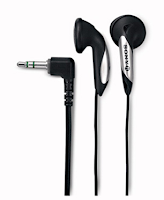
I have been a fan of Sony earphones. However, Sony MDR E8LP just ruined it. Bought it two days back from Sony store and probably I was the first one as these were launched the same day in Mumbai  (were launched on Flipkart few days back, however only deliverable in Bangalore). I was so disappointed with the output, that I went back to the same store in evening and purchased Sony MDR E818LP (my fav for 3 years). MDR E8LP provide an output similar to basic earphones that you get in the box with most of the phones e.g. Nokia. There is no bass and the sound has no depth. Sony calls it 'light weight'. I call it cheap. The plastic used is lighter and cheaper than E818LP. I won't recommend this. Infact, you can buy a pair of E818LP any day, as its many times better and a few bucks cheaper. E8LP costs Rs. 490 (around $10) and E818LP costs Rs. 390 (around $8).


Sony MDR E818LP
Sony MDR E8LP

Sunday, July 21, 2013

Upgrade your Samsung Android phone through Samsung Smartphone Cafe

Random Tip


No Kies needed. No Odin needed. If you want to upgrade your Samsung smartphone to the latest version and your phone doesn't notify about it through built-in OTA (Over The Air) functionality, just step into a Samsung Smartphone Cafe near you, use the upgrade kiosk and follow instructions and your phone is upgraded in five minutes flat. It is as simple as drawing cash from an ATM, really.
Best thing, it's free. A good initiative by Samsung I must say.
Even better, sometimes your phone's OTA does not show the latest updates, nor does Kies. But the Cafes are a step ahead and high chances you'll get your update, if Samsung has ever released it.
However, if you are comfortable doing it through your computer, then Kies and Odin will do the job.
There are loads of step by step instructions available on Google  for above two. Let me warn you though, Kies is painfully slow and does not show the updates half of the time. You don't have to root your phone any of the options.


Wednesday, July 17, 2013

My Data Manager - Manage your 2G/3G data plan

App Recommendation (Android)


If you have a 2G, 3G or 4G data plans that you want to keep a check on so that you don't exceed the monthly limit or don't end up using the whole too soon, then this is one of the best Android apps to do the job. 
Best thing about it is a simple widget that you can place on your homescreen that will show you your usage details.
Just mark your phone billing date in the app once and it will do the job for you.
Another good thing is its easy interface. You can usage breakdown for the apps that have used your data plan. Other features, as mentioned on Play:

• Simple to setup and simple to use.
• Know what apps are using data with automatic monitoring of your app data usage. 
• Set usage alarms to avoid overage charges and “bill shock”. 
• Track historical app time and app usage using easy to understand visualizations.
• Ensure you are using your ideal data plan and maximize how you use your data. 


Jump to the app on Play - My Data Manager